No remote session
The page is rendered by your browser, on your machine. No video stream to wait for, no minutes counted, no queue on an already taken device.
Comparison
BrowserStack rents real devices in the cloud. Mobile FIRST simulates 81 devices in the browser you already have open, for free and without an account. Both do not answer the same question: here's which one, line by line.


1,500,000+ installations · 4.9/5 on the Chrome Web Store
Free installation in seconds · computer only
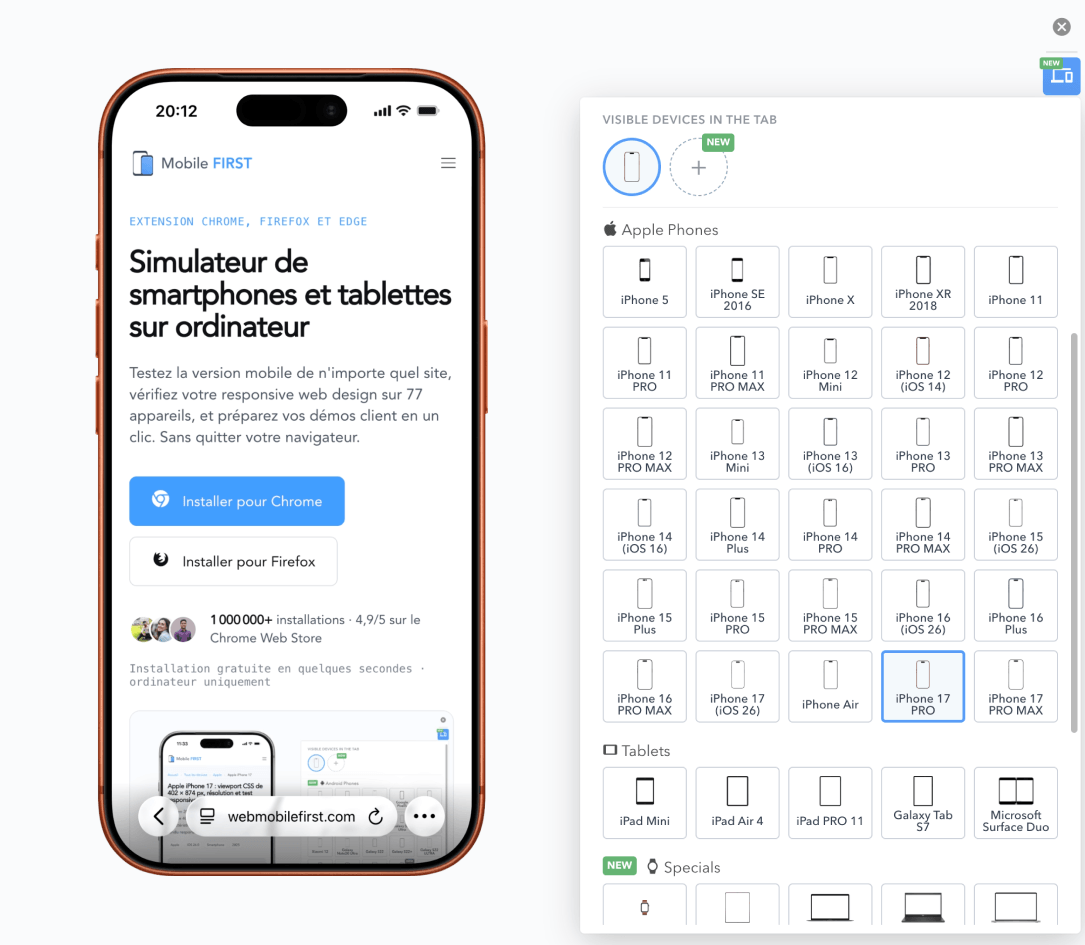
The page is rendered by your browser, on your machine. No video stream to wait for, no minutes counted, no queue on an already taken device.
The extension applies to the current tab, regardless of the URL. A development server, a preproduction behind a VPN: nothing to expose or configure.
Each device applies its CSS width, pixel density, and User-Agent: media queries, breakpoints, and responsive images trigger as on the device.
A local simulator and a cloud of real devices only overlap on part of the work. The lines where BrowserStack wins are in the table as well.
| Feature |  | BrowserStack |
|---|---|---|
| Nature of the test | Simulation in your browser | Real devices and browsers, remotely |
| Rendering engine | Your browser's engine (Chromium or Gecko) | The device's engine, including Safari on iOS |
| Bugs specific to Safari on iOS | Not reproduced | Reproduced |
| Response time | Your machine's | A remote session's |
| Account and subscription | No account, free (optional PRO offer) | Account required, subscription per seat |
| Entry price | Free | $29 per month, billed annually |
| Available devices | 81 preconfigured models, plus your own | 30,000+ real devices, 3,500+ combinations |
| Multiple devices at the same time | Side by side in the same tab | One session at a time per seat |
| localhost and preproduction | Directly, without configuration | Through the BrowserStack Local tunnel |
| Automated tests (Selenium, Playwright, Appium) | No | Yes, starting at $59 per month per parallel test |
| Screenshots and video | PNG with transparent background, WEBM, GIF, MP4 | Screenshots and session recordings |
BrowserStack opens a session on a physical device installed in a data center: the phone exists, its system and browser are those of the manufacturer, and you control it remotely from your browser. Mobile FIRST does not do this. The extension applies the CSS viewport, pixel density, and User-Agent of the chosen model to the current tab, simulates touch events, and lets your own browser display the page.
This difference has a consequence that must be known before choosing: the rendering engine remains that of your browser. A bug specific to WebKit on iOS will therefore not appear in the simulator, regardless of the selected iPhone: a CSS property applied differently, a keyboard pushing the layout, a video refusing to start autoplay. Only a real device, physical or remote, shows it.
What the simulation covers, however, is the essence of integration work: media queries and breakpoints, responsive images and sizes attribute, address bar height, safe areas of a notched screen, landscape switch, PWA mode, horizontal overflows, too-small touch targets. All this depends on the dimensions declared by the device, not its engine, and it is verifiable on the 81 models in the catalog without leaving the window where you write the code.
Hence the usage sharing we assume: the simulator for the dozens of checks in a day of development, the real device for validation before production. The two approaches are not mutually exclusive, and a team that keeps BrowserStack for its final checks has no reason to open a session there to verify a margin at 390 pixels.
66 smartphones · 5 tablets · 9 desktop screens · 1 smartwatch
Old and recent models, updated with each release, with their exact CSS viewport and User-Agent. Each sheet provides the model's measurements: you can verify them before installing anything.
Daily integration
Checking a breakpoint, a too-heavy image, an overflowing title: these are dozens of back-and-forths per day, which no one will do in a remote session billed by the minute.
Pre-production testing
The rendering of Safari on iOS, an Apple Pay payment, a push notification, an old Android: a cloud of real devices like BrowserStack, or a phone on the desk, remains irreplaceable.
Agencies, freelancers, demos
Display multiple devices side by side, export a cut-out PNG capture or a video ready to send to the client: these are deliverables, not tests, and they come out of the simulator in one click.
On the BrowserStack side, manual testing is purchased per seat, on the Live product: $12.50 per month for the Freelancer offer, limited to 100 minutes of monthly testing, $29 for a desktop browser seat, $39 to add real mobile devices, $150 for a team of 5 people. These amounts are the monthly rates displayed for annual billing. Automation is a separate product, billed per parallel test and not per seat, starting at $59 per month.
On the Mobile FIRST side, the extension is free and requires no account: it installs from your browser's store and works immediately. An optional PRO subscription unlocks advanced features, and it is neither a toll on devices nor a count of minutes.
The honest calculation is therefore not "free against $29". It's about the scope: if your need is to check layouts while you develop, the simulator covers it for nothing. If you need to certify a purchase path on Safari iOS before production, no simulator replaces the device, and the BrowserStack seat is justified. Many teams run both, and install the extension first because it costs nothing to try.
No registration, no credit card, nothing to uninstall elsewhere.
For daily responsive development, yes: 81 preconfigured devices, the real viewport and User-Agent of each, touch gestures, without account or subscription. To validate rendering on a specific device's engine, no: the extension simulates a device in your browser, it does not run its system.
No. The extension applies the viewport, density, and User-Agent of an iPhone, but the page is rendered by your browser's engine. A bug specific to WebKit will not be visible: a real iPhone, or a cloud of real devices like BrowserStack, is needed.
For manual testing: $12.50 per month in Freelancer offer limited to 100 minutes, $29 per desktop browser seat, $39 with real mobile devices, $150 for 5 people, in monthly rates for annual billing, recorded in August 2026. Automation is billed separately, per parallel test.
For responsive simulation, yes: Mobile FIRST in its free version, and the responsive mode of your browser's DevTools. For real devices in the cloud, no: free offers from testing platforms are limited to a few trial minutes per month.
Among clouds of real devices, LambdaTest and Sauce Labs meet the same need with a similar model. On the local simulation side, the responsive mode of DevTools is integrated into your browser, and Mobile FIRST adds preconfigured devices, multi-device display, and exports. And a second-hand phone on the desk remains the cheapest real device.
No. The extension installs from your browser's store and works immediately, without registration. The PRO subscription is optional and does not condition access to devices or usage duration.
Yes, directly: the extension applies to the current tab, regardless of its URL. This is a practical difference from a remote cloud, which must reach your machine through a tunnel installed for the occasion.
Installation takes a few seconds and requires no account: you will judge on your own site.
Free · 4.9/5 on 5,100 reviews
1,500,000+ users
Rates and volume recorded on browserstack.com/pricing in August 2026, in US dollars, for annual billing.
BrowserStack is a trademark of BrowserStack Inc. Mobile FIRST is neither affiliated with nor endorsed by BrowserStack.